This Week in the Classroom: Pantographs

My school spends a lot of time, energy and financial resources on project-based learning.  In my experience, teachers use project-based learning as a catch-all term for anything from make-it-take-it projects which last twenty minutes to inquiry-driven, rubric-graded, long-term explorations.  Calling the former project-based learning is lazy and misdirection.  Creating incredible experiences for students with the latter definition is exhausting and rewarding.  Most of the time, a teacher must follow a middle course.  This is one of those projects.

We started off by designing and building pantographs.  If you don’t know anything about pantographs – check out the video below.  Also check out http://www.peter.com.au/articles/pantograph.html for instructions on how to build a professional-quality pantograph.  This site contains a java applet which allows students to digitally explore a pantograph’s mechanics before use.  I’ve included a Sketch Up model in my section of the 3D Warehouse.

Afterwards, my student’s worked through a number of percentage problems based on their pantograph’s working results.  I don’t include a lot of variety in the type of problems, but you can modify the problem sets to reflect your curriculum needs.  If this series of projects interest you, feel free to use them in your own classroom.

Make it safe & keep the rubberside down this week.

This Week in the Woodshop: Footboard, Pt. 2

Last week, I showed everyone the biggest project sitting on my workbench.  This week I completed the footboard just in time for Valentine’s Day.  I celebrated its completion by buying my wife a dozen roses, and taking her on not one, but two, dates in one weekend.

DSC01813
Completed footboard. Click on the picture to see the Sketch Up file and examine the construction.

But I’m back in the doghouse, I mean, woodshop now.

I hope you enjoyed the pictures.  I designed the footboard with dovetailed (and splinted) carcass, rear panels from birch ply floating in dados, solid wood support beams on the ends.

This slideshow requires JavaScript.

Finishing this guy was an adventure in and of itself.  I discovered a rule about shellac: never use shellac when it’s raining.  The humidity causes a white-ish blushing.  I had to wipe off the shellac with a rag soaked in alcohol to solve the issue…which caused most of the unevenness you can see in the photos.  It’s not terribly noticeable in real life, but the flash brings out the worst.

Make it safe & keep the rubber-side down  this week.

Classroom Project: Try Squares

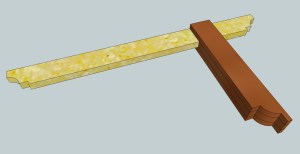
In my Applied Mathematics class, woodshop has put the shop in applied.  During a unit on fractions, I asked students to build a number of these try squares, all different shapes and sizes.  In order to assess my students ability to read a ruler and calculate fractions, I made all the dimensions wonky.  No 8″ cuts for my students!  Dimensions looked like 8 3/4″, 4 3/8″, 5 “1/16 and all sorts of foolishness.  Once I felt my students had mastered the build process, we took our show to Houston’s Mini-Maker Faire!

Try Square
Click here to download the File from Sketch Up’s 3D Warehouse

The construction process for a tool like this can be as complex as you want, something simpler, or something you can complete in five minutes.  The five minute version sounds like this:

1.  Cut your beam from straight-edged 1″or 3/4″ x 1/4″ thick stock.  I like mine about 8″.  You can get thin stock like this at Home Depot or Lowe’s, but I’m not sure on the widths available.

2.  Cut three 6″ lengths to become your try square stock.

3.  Use a speed square set the interior angle while you clamp the four pieces together with carpenters glue.  The middle piece of stock should stick out of the center by the width of your beam.

4.  Wait until the glue dries.  Carefully use a chisel or file to remove the squeeze out.

5. Check accuracy.

"Be Square With the World, Take Good Care of Your Tools" - The Carpenter, Guy Clark
“Be Square With the World, Take Good Care of Your Tools” – The Carpenter, Guy Clark

At the end of every square build, we tested the accuracy of our try squares.  I used this pdf to explain the process and try to introduce proportions to my young charges.  We successfully created a handful of accurate try squares.  We created way more inaccurate try squares.  I know, you could use those other plans and have a perfect try square.  You could build ten of mine and come away with three working models!

I’ve found this is a great project for medium-sized hands.  With the smaller students (or quicker builds) we screwed the stock and beam together.

How accurate will your try square be?


Make it safe & keep the rubber-side down this weekend!

This Week In the Shop: In-Progress Bed Design and Build

You may have noticed a distinct drop off in the frequency of posts here on WoodshopCowboy since the beginning of the year.  In that great crucible of life, demands of life has reduced my shop time.

Mostly, though, a majority of woodworking time has been caught up in a commission from my wife: a bed.

I’m chasing the look of Crate and Barrel’s Atwood platform bed in a queen size.  It looks something like this:

Crate and Barrel’s Atwood Bed

And here’s what I have so far – racked in clamps.  I’ve dovetailed the corners of the case.  The back panels and frames float in a 1/4″ groove across the piece.  The large supports on each corner are 2″ square birch posts, offering (I hope) substantial support for the bed frame system I’ll install later.

DSC01778

I’ve tackled long-term projects like this before (my woodworking tool-box, for starters) but this one has taken both my “blogging” and my “logging” energy.  Check back soon – I’m hoping to have the foot board installed in the next few weeks.  I have a few gaps to fill.

A wise woodworker once said, "Every woodworker has bad dovetails in them.  The question really is how fast we work through them."  I'm still  a work in progress.
A wise woodworker once said, “Every woodworker has bad dovetails in them. The question really is how fast we work through them.”
I’m still a work in progress.

You can take a look at the Sketch Up model below to see the dimensions for yourself.

Footboard of New Bed in Google Sketch Up

Make it safe & keep the rubber side down this week.

Community Watch: Houston Mini-Maker Faire

On Jan. 19th, I had the chance to attend and participate in Houston’s first annual Mini-Maker Faire.  I brought 8 students, 3 fellow teachers (or maybe Ms. J brought me), a woodworking bench, my traveling chest of hand tools and a whole lot of salvaged pine.

Maker Faire brings together families and individuals to celebrate the Do-It-Yourself (DIY) mindset and showcase all kinds of incredible projects. At Maker Faire, you’ll find arts and crafts, science and engineering, food and music, fire and water but what makes this event special is that all these interesting projects and smart, creative people belong together. They are actively and openly creating a maker culture. ~ www.makerfairehouston.com

What did we do?  We built small try squares.  Nothing very fancy, just some tools for the shop.  Our students used miter box and pull saw, wood glue, clamps, coping saw, hand drill and brace (with bits and drivers) in their work.

This slideshow requires JavaScript.

You can check out what they wrote about us at: http://blog.makezine.com/2013/01/29/houston-mini-maker-faire-2013/

Make it safe & keep the rubber side down.

Community Watch: Houston Mini Maker Faire

On Jan 19th, I will showcase student projects at Houston’s first Mini-Maker Faire.  Come see a student-build geodesic dome and participate in a woodworking demonstration lead by student-experts!


HMMF Poster_2012-11-30 (web) v2

Maker Faire brings together families and individuals to celebrate the Do-It-Yourself (DIY) mindset and showcase all kinds of incredible projects. At Maker Faire, you’ll find arts and crafts, science and engineering, food and music, fire and water but what makes this event special is that all these interesting projects and smart, creative people belong together.  It is a show-and-tell format for people of all ages that brings out the “kid” in all of us. Maker Faire is a community-based learning event that inspires everyone to become a maker and connect to people and projects in their local community.

Sounds like just the place for students to be presenting, learning, constructing and practicing!  Tickets are $15 for adults, $10 for children at pre-sale (http://www.makerfairehouston.com/attend/) and $20 on the day of, so get your tickets soon!

For more information, visit www.makerfairehouston.com!  Hope to see you there with a smile and a look of wonder!


What is Maker-Faire?
Maker Faire is the World’s Largest Show (and Tell) festival—a family-friendly showcase of invention, creativity and resourcefulness, and a celebration of the Maker movement. It’s a place where people show what they are making, and share what they are learning.


Makers range from tech enthusiasts to crafters, educators, tinkerers, hobbyists, engineers, artists, science clubs, students, authors, and commercial exhibitors. They are of all ages and backgrounds. Maker Faire’s goal is to entertain, inform, connect and inspire these thousands of Makers and aspiring Makers.


The inaugural Maker Faire was held in San Mateo, California and in 2012 celebrated its seventh annual Bay Area event with some 110,000 people in attendance. As Maker Faire has grown in popularity and relevance, additional flagship faires were launched in 2010 in Detroit and New York City. Community-driven, independently produced Mini Maker Faire events inspired by Maker Faire are now being produced around the United States and the world, including here in Houston. 

This Week in the Classroom: Rulers & Frames

Applied Math Made Easy, a hands-on, application-heavy curriculum designed by a pair of teachers from Wisconsin, has a number of great math labs and activities.  Using worksheets to convey directions and learning, the curriculum utilizes a conversationalist tone and “interactive reading” (their term, not mine) to let students learn middle school to high school level mathematics – about a 9th to 10th grade range.  I’ve co-taught with teachers who’ve used this curriculum and I can say this:  it works.  Incredibly well, when your students can read, understand and follow instructions at a high school level.

I don’t teach those kids.

So here’s what I do:  I take a look at the lab and find a focal point.   For example, reading rulers.  The act of reading a ruler supports numerous mathematical standards and the act of building a ruler provides a concrete experience for the student.  In this activity, students use 3/8″ lengths of pine to create thick “rulers” – they split the ruler into sixteenths using string.  They can then label each division they make – so along the way, the see how a whole can be split into parts and further into more parts.  Number sense, division, and differentiated learning all in one.  I had some successes, and some near successes.

A near miss.  This student can split his work into eights, but loses his way splitting things into sixteenths.  In context of his neurological differences, this is consistent with his mathematical competency - somewhere between third and fifth grade.
A near miss. This student can split his work into eights, but loses his way splitting things into sixteenths. In context of his neurological differences, this is consistent with his mathematical competency – somewhere between third and fifth grade.

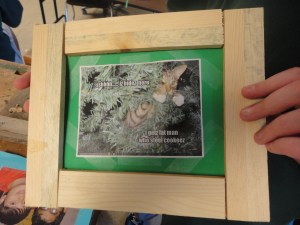
After building these rulers, we built picture frames.  Again, an exercise in measurement and utilizing fractions.  In between the ruler project and these frames, my students spent a lot of time manipulating common fractions – into decimals, adding fractions with like denominators, measurement and more measurement, both in real world situations and abstract number problems.  Eventually, we built these pieces.

DSC01562

My guys improved tremendously.  All read their rulers correctly, to the eighth.  They  were less successful with their calculations, getting about 1/2 to 3/4 of the problems correct.  Way better than their 12.5% to 25% they answered correctly in the pre-unit activities.  Next project: the try square for our interactive display at Houston’s Mini Maker Faire.

This slideshow requires JavaScript.

Make it safe & keep the rubberside down this weekend.  In the shop, I have a new apprentice – my youngest brother-in-law is spending his holiday break building frames with me.  Seems you can take the woodshop away from the teacher, but you can’t move the teacher from the woodshop.

This Week in the Shop: Mirror, Mirror

I swear the conversation went like this:

Wife: “What dress should I wear?”

Me: “I don’t know, you look great in anything.”

Wife: “This dress?  What about this one?”

Me: “I don’t know if you’ve been watching me, but I haven’t taken my eyes off you in forty minutes.”

Wife:  “I need a full length mirror, I can’t see anything here.”

Me:  “I can handle that.”  Exit stage right.

I know a good exit line when I’m handed one.

Mirror from Lowe’s, sans frame.   A saw kerf down the middle makes a perfectly sized dado.  Pocket hole construction.  The mortise-looking splines came from a botched attempt at a bridle joint, similar to these frames.  Finished with a three coats of amber shellac and paste wax.  Feels inviting to the hand.  I especially like the chamfer detail at the corners.  Hung with a French cleat.

This slideshow requires JavaScript.

Make it safe & keep the rubberside down this weekend.

Courses: Fall 2012

At TX/RX Labs:

Woodworking: Create a small hardwood box using router, planer, bandsaw, handplane/jointer, table saw or miter saw (also known as the Tea Box Project)

In the School Classroom:

Computer Applications: CAD

In this course, students will create and build physical and digital representations of the world around them.  The act of drafting, whether on paper or computer, engages a student’s visual-spatial skills and connects intimately with their understanding of geometry.  Students will also engage in a semester long product development course which will support their mathematics course work.  Computer Assisted Design is the use of computers and specialized software to create digital objects whether animations, skyscrapers or the interiors of engines.

Computer Applications: Video Composition & Production

This class is an instructional, hands-on course in the art of production.  Students will learn industry concepts, the pre-production process of video production, camera angles, lighting, composition, how to film a documentary, and the post-production process to create a finished film.  Students will play with concepts such as stop motion animation as well as various effects and transitions used to sweeten the visuals of a film.  — This particular description actually written by my co-teacher in the course.  I’m the technical geek, she’s the production powerhouse —

Scientific Method: Environmental & Life Sciences

In this course students will journey from the microscopic to the macroscopic, examining and drawing comparisons between natural systems and their mechanical equivalents.  Students will begin in the single-cell and cellular processes and end the year discover the interplay between numerous global systems.  Projects will consist of research, modeling and experimenting with various biological and environmental systems, such as the circulatory system from electronics or the heating and cooling systems using solar water heaters.

This course will place a premium on utilizing the scientific method as a vehicle for learning.  Students will participate in numerous scientific labs and construction projects.  Students will learn proper laboratory and woodshop safety, formulate hypotheses, design experiments and communicate their results to the wider world via Web 2.0 publishing tools.

Middle School Mathematics & Technology

This course is designed to take students on a middle school journey through mathematics via minds-on, hands-on and computer-based projects.  Students will practice and improve their numerical fluency, create and measure geometric physical and computer models, interpret and manipulate graphs and equations and extend their knowledge of probability and statistics.

This course is designed for students to progress through specific math targets informed by the Core Curriculum Standards.  Students will utilize physical and computer manipulatives, construct learning aids and progress tracking software and tools to inform their learning.

Integral to this course will be a technology component.  Mathematics & Technology will be held in the “Steamworks”, Monarch’s STEM (Science, Technology, Engineering and Math) Lab – this allows students access to computer-modeling software,  blogging and other media creation software & basic productivity software access.

Community Watch: Build A Box!

Eight students, six boxes built and finished.  It was a long day in the shop – nearly seven hours with only a few breaks for liquids.  I can  think of a number of great moments: the first box getting nailed together, the last coat of shellac being applied, the look of what-have-I-got-myself-into as the students tackled nearly 40 linear feet of hardwood for the first time.  We captured the moment which stands out most for me in the picture below.

DSC01394

Take a good look at the boy in the white shirt.  Take a good look at his smile.  He didn’t get to build a box that day.  He had to work and work hard keeping up with a manic teacher and seven students as a teaching assistant.  He hustled and bustled and sweated through a long day in a shop he didn’t know, with people he didn’t know, with a project he helped design and make happen.

But here he is, seven hours later – still smiling.

I make a few right decisions.  Bringing him along was the best one I made that day.

Enjoy a few more pictures.  Build something in the shop today.

This slideshow requires JavaScript.

If you want to build a box, I’ve posted my preliminary directions up here.

Make it safe, keep the rubberside down.  And forgive someone today.